Mar 2, 2025 - 11 min
Fine-Tune Embeddings for RAG to Improve Retrieval
Does your RAG application throw up bizarre, irrelevant content? The issue might not be your LLM but your retrieval. Fine-tune embeddings for RAG can significantly improve retrieval quality.
When your RAG application doesn’t work, you don’t need to throw a bigger LLM at it for better response generation. What you need to do is improve your retrieval process. In this blog, we look at ways to enhance retrieval of RAGs.
There are a few ways to improve the retrieval process–
- better quality data
- selecting better models
- reranking suggestions
- better retrieval by finetuning embedding models
Before we move to the crux of this article, let’s briefly talk about the other methods–
-
selecting better models: often people end up selecting models like all-MiniLM-L6-v2, which is not tuned for retrieval, and instead is better suited for sentence similarity tasks. A better option would be to select the models listed here
-
reranking suggestions: post retrieval, cross encoders can help rerank documents by relevance to improve suggestions
-
chunking: often passages that are too long tend to lose nuances. Chunking helps maintain the meaning of passages by breaking them down to smaller pieces
alright now for the main section…
Better Retrieval by Fine-tuning Embedding Models for RAG
If your RAG application isn’t retrieving relevant documents, the fault most likely could be with your embedding model. So how do we improve our embedding model? Good news–there are two ways we can do this
- Unsupervised Tuning
- Supervised Tuning
It’s a godsend that we can tune these data-hungry models via unsupervised tuning. It makes life simpler when having tagged data is an expensive affair.
Unsupervised Training (TSDAE) for Fine-tuning Embeddings
In this method, we intentionally remove words from a sentence to create a corrupted version. The goal is to train the model to reconstruct the original sentence. To achieve this, we first encode the corrupted sentence into a fixed-size vector. Then, a decoder attempts to regenerate the original sentence from this vector. For the reconstruction to be effective, the embeddings must capture the core semantics of the sentence accurately.
Below is a simple outline of how this approach works
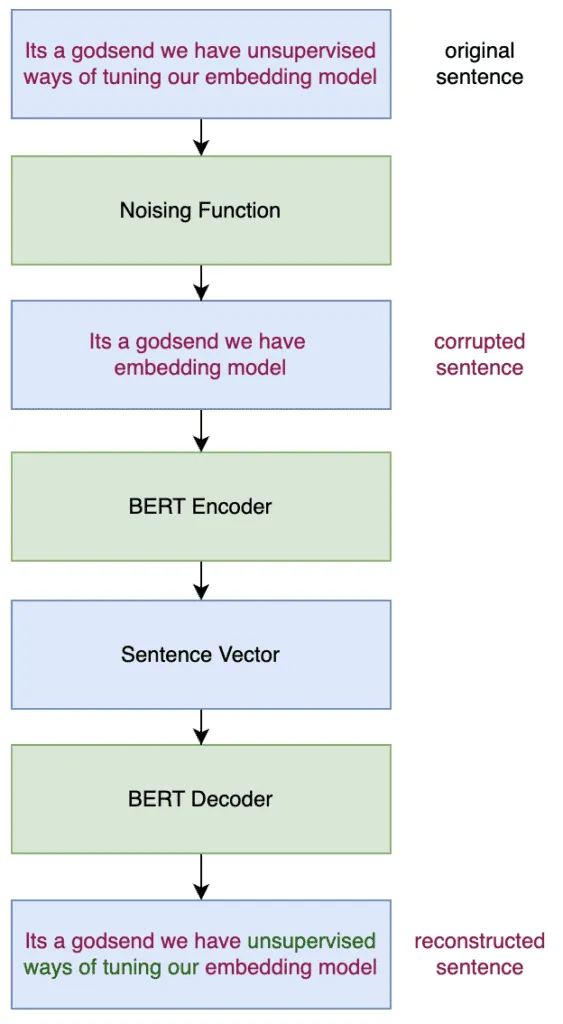
This approach is called TSDAE. This is the approach we will use to fine-tune embeddings for RAG to improve retrieval. You might be wondering what TSDAE means. It stands for Transformer-based Sequential Denoising Autoencoder. You can read the original paper here.
A few questions arise when we look at the overview of the TSDAE process above. It mentions involving a decoder as well. But where does the decoder come from?
For training our model, we use a special noise called DenoisingAutoEncoderLoss. Taking a closer look at the source codereveals this–
self.decoder = AutoModelForCausalLM.from_pretrained(decoder_name_or_path, **kwargs_decoder)Since our model is generally encoder only, it doesn’t have a separate decoder stack like in a seq-seq model (e.g., T5, BART). So where do we come up with a compatible decoder from? We use a nifty little trick–
train_loss = DenoisingAutoEncoderLoss(model, decoder_name_or_path=model_name, tie_encoder_decoder=True)We set the tie_encoder_decoder parameter as true. What it means is we reuse the encoder as the decoder itself! The encoder processes the input sentence to generate a vector representation. The decoder then attempts to reconstruct the original input from the vector embedding.
As we train the model, we also tune the decoder weights. We initialize the decoder with the same weights as the encoder (weight tying), but it is trained to act as a decoder. During training, the decoder learns separately. There is another way, which is to randomly initialize, but that would take much longer to tune. So during training we learn weights for all three
- encoder weights
- decoder weights
- token embeddings
Code to Fine-tune Embeddings for RAG
Alright, we have looked at the overall flow, and we have understood the core component of how the training happens. Now let’s get to the implementation– the heart of how to fine-tune embeddings for RAG to improve retrieval.
Setup the Basics
First, let’s get our imports in order…
import random
import sys
from datetime import datetime

import tqdm
from datasets import Dataset, load_dataset

from sentence_transformers import SentenceTransformer, models
from sentence_transformers.evaluation import EmbeddingSimilarityEvaluator
from sentence_transformers.losses import DenoisingAutoEncoderLoss
from sentence_transformers.similarity_functions import SimilarityFunction
from sentence_transformers.trainer import SentenceTransformerTrainer
from sentence_transformers.training_args import SentenceTransformerTrainingArguments
and some basic params as well…
model_name = "sentence-transformers/msmarco-MiniLM-L6-cos-v5"
train_batch_size = 8
num_epochs = 1
max_seq_length = 75
output_dir = f"output/training_tsdae-{model_name.replace('/', '-')}-{train_batch_size}-{datetime.now().strftime('%Y-%m-%d_%H-%M-%S')}"
Next step, let’s load our model of choice
model = SentenceTransformer(model_name)
model.max_seq_length = max_seq_length
Since we are loading a sentence transformer, we don’t need to worry about the pooling. But in case you are looking to tune a BERT model, you need to add the mean pooling step as well
model_name = "bert-base-uncased"
word_embedding_model = models.Transformer(model_name, max_seq_length=max_seq_length)
pooling_model = models.Pooling(word_embedding_model.get_word_embedding_dimension(), "cls")
model = SentenceTransformer(modules=[word_embedding_model, pooling_model])
Prepare the Data for Fine-Tuning
Alright, next step is to get our data in. Now this is where you bring in the data that you want to fine tune on. I am going to use a toy dataset to keep things simple. But you can use whatever you like
train_sentences = [
    "Movies are a form of visual storytelling that combines sound, images, and dialogue.",
    "The film industry produces various genres, including drama, comedy, action, and science fiction.",
    "Cinematography refers to the art of capturing visual images to create a desired effect in a movie.",
    "Directors play a crucial role in shaping a film’s artistic and narrative vision.",
    "Screenplays serve as the written blueprint for a movie, detailing dialogue and scene directions.",
]

# convert to dataset
dataset = Dataset.from_dict({"text": train_sentences})
Next is a crucial step– the core of the TSDAE– which is corrupting the sentences
def noise_fn(text, keep_ratio=0.8):
    from nltk import word_tokenize
    from nltk.tokenize.treebank import TreebankWordDetokenizer

    words = word_tokenize(text)
    n = len(words)
    if n == 0:
        return text

    kept_words = [word for word in words if random.random() < keep_ratio]
    # Guarantee that at least one word remains
    if len(kept_words) == 0:
        return {"noisy": random.choice(words)}

    noisy_text = TreebankWordDetokenizer().detokenize(kept_words)
    return {"noisy": noisy_text}
Let’s pause here a minute to understand this part. We do the following steps
- take in a text
- tokenize it to words
- randomly keep a fixed percentage of words
- detokenize the words, i.e., put back the words as text
- if we end up removing all the words, we make sure to select at least one word randomly
The keep_ratio is a hyperparameter and I recommend you experiment with it to see its impact. TSDAE requires a dataset with 2 columns: a text column and a noisified text column. You can use any other method to add noise to your text.
dataset = dataset.map(noise_fn, input_columns="text")
dataset = dataset.train_test_split(test_size=4)
train_dataset = dataset["train"]
eval_dataset = dataset["test"]
print(train_dataset)
print(train_dataset[0])
"""
Dataset({
    features: ['text', 'noisy'],
    num_rows: 4
})
{
    'text': "Movies are a form of visual storytelling that combines sound, images, and dialogue.",
    'noisy': 'Movies are a form storytelling that combines images, dialogue.',
}
Setup the Loss Function for RAG Embeddings
Next stop is our loss function. We will use the DenoisingAutoEncoderLoss. This will likely result in warnings as we’re loading model_name as a decoder, but it likely won’t have weights for that yet. This is fine, as we’ll be training it.
train_loss = DenoisingAutoEncoderLoss(model, decoder_name_or_path=model_name, tie_encoder_decoder=True)From the documentation–
This loss expects as input a pairs of damaged sentences and the corresponding original ones. During training, the decoder reconstructs the original sentences from the encoded sentence embeddings. Here the argument ‘decoder_name_or_path’ indicates the pretrained model (supported by Hugging Face) to be used as the decoder. Since decoding process is included, here the decoder should have a class called XXXLMHead (in the context of Hugging Face’s Transformers). The ‘tie_encoder_decoder’ flag indicates whether to tie the trainable parameters of encoder and decoder, which is shown beneficial to model performance while limiting the amount of required memory. Only when the encoder and decoder are from the same architecture, can the flag ‘tie_encoder_decoder’ work.Set up the Evaluator for Retrieval Performance
We will set up an evaluator on the STS-B dataset to ensure that while training on our dataset, the model retains its general semantic understanding. A slight performance drop is expected as a trade-off, but a severe decline should make you skeptical
stsb_eval_dataset = load_dataset("sentence-transformers/stsb", split="validation")
dev_evaluator = EmbeddingSimilarityEvaluator(
    sentences1=stsb_eval_dataset["sentence1"],
    sentences2=stsb_eval_dataset["sentence2"],
    scores=stsb_eval_dataset["score"],
    main_similarity=SimilarityFunction.COSINE,
    name="sts-dev",
)
logging.info("Evaluation before training:")
dev_evaluator(model)
Additionally, if you are going to use this tuned model on another task, then measuring the performance of this model on that task before and after the tuning would keep you informed of the progress
Training the Model for Better RAG Retrieval
And finally down to the last main step! You can tinker with the parameters as you feel fit. The learning_rate param is rather crucial and should be selected carefully. There are other params like fp16 and bf16 that can speed up the training process, but depends on the hardware support
args = SentenceTransformerTrainingArguments(
# Required parameter:
output_dir=output_dir,
# Optional training parameters:
learning_rate=3e-5,
num_train_epochs=1,
per_device_train_batch_size=train_batch_size,
per_device_eval_batch_size=train_batch_size,
warmup_ratio=0.1,
fp16=True, # Set to False if you get an error that your GPU can't run on FP16
bf16=False, # Set to True if you have a GPU that supports BF16
# Optional tracking/debugging parameters:
eval_strategy="steps",
eval_steps=1000,
save_strategy="steps",
save_steps=1000,
save_total_limit=2,
logging_steps=100,
)
trainer = SentenceTransformerTrainer(
model=model,
args=args,
train_dataset=train_dataset,
eval_dataset=eval_dataset,
loss=train_loss,
evaluator=dev_evaluator,
)
trainer.train()# model saving
final_output_dir = f"{output_dir}/final"
model.save(final_output_dir)Post-Training Evaluation to Improve Retrieval
Now that you’ve learned to fine-tune embeddings for RAG to improve retrieval, it’s important to evaluate your model’s performance. Check its results on the STS-B dataset or your downstream task to ensure it isn’t suffering from catastrophic forgetting or other issues
dev_evaluator(model)Considerations for Fine-Tuning RAG Embeddings
We’ve been through a lot so far, and it would be a missed opportunity not to share some practical tips for the training process. Training requires patience and effort, so I’d recommend you go through this block before you hit start on the training process.
weight_decay: begin with a lower value in the range of 1e-5 to 1e-4 to reduce overfitting while maintaining model stabilitylearning_rate: avoid setting it too high, as this can lead to catastrophic forgetting. A good starting point is 3e-5, 1e-5, or 1e-6epoch: start with one epoch and gradually increase based on performancekeep_ratio: this is dataset-dependent and can be treated as a hyperparameter. Try out values between 0.6 and 0.9 to find the optimal balance
That’s a wrap on how to Fine-Tune Embeddings for RAG to Improve Retrieval. Hope you enjoyed reading! You can check out more stuff here!